Professional Portfolio · Project
VU Mate — First Year University Survival Chatbot
A Voiceflow AI chatbot that acts as a 24/7 triage layer between first-year VU students and the university’s support infrastructure — designed to reduce both friction and anxiety in a single interaction.
The Problem
A navigation problem — not a resources problem.
VU has the services. First-year students just can’t find them — or are too anxious to ask.
First-year VU students consistently struggle to access university support. The barrier is not a lack of services — it is not knowing which service exists, how to access it, or feeling too anxious to ask a human. Hwang & Chang (2021) identify first-year transition as the highest-risk period for disengagement. Labadze et al. (2023) found that NESB students in particular report embarrassment and anxiety when approaching staff directly.
Information Scatter
Support services spread across multiple websites, handbooks, and portals with no single triage point. Students must already know what they need before they can find help.
Anxiety Barrier
Hwang & Chang (2021): first year = highest disengagement risk. NESB students report embarrassment and anxiety when approaching staff directly. So they don’t.
24/7 Access Gap
Human services close at 5pm. Student distress doesn’t. The absence of after-hours support is a structural equity issue — not a convenience gap.
No Triage Layer
Without a guided entry point, students experiencing compounding problems cannot self-direct to the right service quickly enough to prevent disengagement.
Four compounding barriers facing first-year VU students — grounded in Hwang & Chang (2021) and Labadze et al. (2023).
The Person
Meet Maya.
VU Mate was designed for Maya — and every first-year student like her.
It’s 11pm. My assignment is due tomorrow and I don’t understand the rubric. I’m too embarrassed to email my lecturer this late. I just feel lost.
Maya, 19 — first semester VU student, Werribee campus
| Background | NESB, first-in-family at university |
| Device | Mobile-first |
| Campus | Werribee / City |
| Barrier | Anxiety + not knowing where to go |
| Core need | Immediate, non-judgmental help |
User Story — As a first-year VU student stressed at 11pm, I want to quickly find the right service and know what to do — without waiting until morning.
The Solution
VU Mate — a triage layer, not a helpdesk.
A Voiceflow AI chatbot available 24/7, sitting between the student and VU’s support infrastructure.
VU Mate is a Voiceflow AI chatbot that acts as a guided triage layer between first-year VU students and the university’s support infrastructure — available 24/7, free to use, and designed to reduce both friction and anxiety in a single interaction. The bot persona is a peer, not a helpdesk. Agent instructions enforce warm, non-judgmental language throughout and a hard 2–3 sentence response limit per message.
👤
Persona-Driven Agent
Named ‘VU Mate’ — a peer, not a helpdesk. Warm, non-judgmental language enforced in all agent instructions throughout every branch.
🔀
5-Branch Flow
Assessment · Wellbeing · Contacts · Explore · Unable to Assist. Every branch loops back to main menu — no dead ends.
📄
VU Knowledge Base
Custom VU-specific PDF uploaded to Voiceflow. Answers drawn from real VU services — correct phone numbers, actual processes, not generic AI.
🛡
Safe Boundaries
No medical, legal, or psychological advice. Serious wellbeing concerns route to VU Counselling — the bot never substitutes for professional support.
The four core design pillars of VU Mate — persona, flow, knowledge base, and ethical scope boundaries.
The ‘Unable to Assist’ branch is the evidence of systems thinking: defining what the bot should not do is as important as what it should.
Concept rationale — VU Mate design documentation
The Build
Three layers. One coherent system.
Each layer has a distinct function. The routing layer determines context before the AI generates a single word.
Voiceflow: Button nodes + Condition blocks
Before the AI responds, button nodes triage the student’s need into one of five contexts. A student selecting ‘feeling overwhelmed’ is placed in a wellbeing context first — preventing the AI from giving assignment advice to a student in distress.
This layer determines the quality of everything that follows.
VU-specific PDF — 5 sections, 5 branches
AI responses are drawn from the uploaded VU document — not from generic model training data. This ensures correct phone numbers, real services, and actual VU processes.
Campbell & Cox (2024): institution-specific responses significantly increase student engagement over generic AI answers.
Custom system prompt — 5 rules
The system prompt specifies: persona (peer mentor), tone (warm, non-judgmental), response limit (2–3 sentences, hard rule), scope limits (no medical/legal/financial advice), and fallback behaviour (route to VU Counselling for serious concerns).
Without the prompt, you get a generic AI. With it, you get VU Mate.
Three-layer VU Mate architecture — routing logic, knowledge base, and AI agent operating as a coherent system.
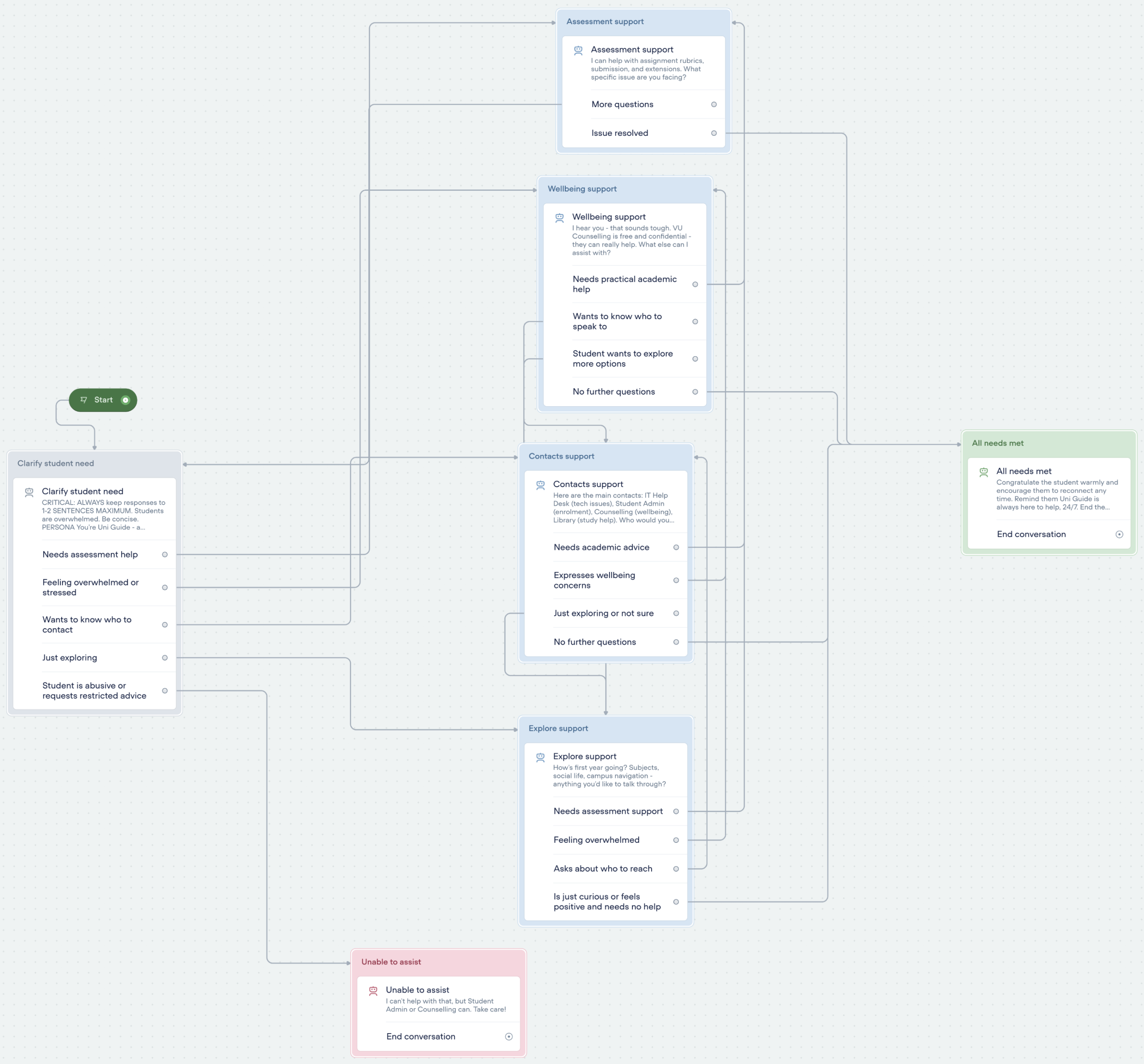
VU Mate conversation flow built in Voiceflow — five branches (Assessment, Wellbeing, Contacts, Explore, Unable to Assist) routing from the central triage node, with loop-back paths and a safe exit for out-of-scope requests.
UX Laws Applied
Three UX principles shaped real decisions during the build — not post-hoc frameworks, but active constraints that governed specific choices.
Hick’s Law
Time to decide increases with number of choices.
VU Mate presents exactly five options at intake. Students in distress cannot process more. Five is the deliberate maximum — not an arbitrary limit.
Miller’s Law
Working memory holds 7 (±2) chunks of information.
All responses are capped at 2–3 sentences — enforced as a hard rule in agent instructions. Brevity is an accessibility decision, not a style preference.
Jakob’s Law
Users expect new products to work like familiar ones.
Conversation design mirrors messaging apps. Students use these daily. Matching that pattern removes onboarding friction entirely — no learning curve.
Universal Design for Learning
Accessibility was a design constraint from the first decision — not an afterthought. Almeqdad et al. (2023) found that applying all three UDL principles produced a 37% increase in learner performance across diverse student populations.
Representation
Information must reach every student
- 2–3 sentence cap — no walls of text
- Plain language, no academic jargon
- Buttons AND free text accepted
- Mobile-first — any device, any time
- VU-specific content, not generic AI
Engagement
Reduce barriers, don’t add to them
- Available 24/7 — no office hours barrier
- Non-judgmental tone throughout
- No embarrassment — student talks to a bot
- Low-stakes — no permanent record
- Immediate response — no queue, no wait
Expression
Students control how they interact
- Buttons or free text — student’s choice
- No forced linear journey
- Explore branch for students unsure of their need
- Return to main menu at any point
- Future: voice input for further accessibility
UDL three-principle framework applied as active design constraints — aligned with Almeqdad et al. (2023).
Expertise Developed
Three areas of expertise were developed through the build process, each directly shaping the final product.
The challenge
Early prompts produced accurate but generic responses. Iterating the prompt to prioritise KB content over training data — while enforcing the 2–3 sentence rule without making responses feel cut off — required multiple cycles.
The prompt is the invisible infrastructure. Without it, any platform gives the same generic answer.
The challenge
Moving from linear script thinking to a multi-branch looping system with explicit edge case handling: abuse, out-of-scope requests, and the Explore branch for students who cannot name their need.
The loop-back structure and safety boundary are what make this production-ready rather than a classroom prototype.
The challenge
Applying UX laws and UDL as active design constraints, not post-hoc frameworks. The hardest part: resisting the urge to over-build. Miller’s Law as a constraint means saying no to more content.
Accessibility expertise improves the tool for every user — not just users with identified needs.
Live Demo
VU Mate — five steps through the full user journey.
Built and running in Voiceflow. The five-step walkthrough below captures the complete student interaction from entry to exit.
Illustrated conversation flow — representative of the working Voiceflow prototype.
Illustrated mockup — representative of the working Voiceflow prototype.
The Test
Ethical, inclusive, and iterative user testing.
Roca et al. (2024): user feedback loops are the most critical factor in whether a chatbot is useful or abandoned.
Testing followed a structured ethical process. Three peers tested the bot independently with no assistance or prompting from the observer. Verbal informed consent was obtained from each tester. Notes were anonymised. Testers were told they could stop at any time. No names were attached to any recorded observation.
- Button navigation — efficient, simple and easy to use
- Warm, empathetic tone validated student anxiety naturally
- Two clear pathways: academic support & emotional wellbeing
- Free-text input handled full conversational context well
- Verbosity — responses too long, “See more” clicks frustrating
- No back-to-menu button; navigation not immediately clear
- No chatbot avatar made the interface feel impersonal
- Colour scheme felt plain and not visually engaging
“This would genuinely reduce 11pm anxiety and provide actionable next steps. The validation alone helps, and the concrete advice is practical and immediately useful.” — Maya persona user testing
User testing results — what worked, issues identified, and likelihood-to-use score from Maya persona testing.
Future Development
Where VU Mate goes from here.
Six improvements identified through user testing, plus four strategic development priorities for the next phase.
Future Improvements — from Testing
Shorten Responses
Reduce verbosity across all conversation branches — keep advice concise and scannable for a student on mobile under pressure.
Add Chatbot Avatar
Introduce a chatbot agent image to create a friendlier, more personal feel.
Refresh Colour Scheme
Update the interface colour palette to be more engaging and on-brand.
24/7 Availability Signal
Clearly indicate the bot is available around the clock — critical for a student at midnight.
Human Escalation Pathway
For severe mental health concerns, offer a clear handoff to a real person rather than just linking to services.
Save & Share Functionality
Allow students to save or print key advice and contact details so they don’t lose the information after closing the chat.
Strategic Development Priorities
01
Expanded Knowledge Base
Upload the full VU Student Handbook, faculty-specific FAQs, timetabling information, and enrolment processes.
02
Personalisation Layer
Ask for name, course, and campus at conversation start. Campus-specific routing for Werribee vs City.
03
Multilingual Support
VU has large Mandarin, Vietnamese, and Arabic-speaking student cohorts. A translation layer would directly extend the bot’s equity impact.
04
VU Portal Integration
Embedding VU Mate in the student portal removes the discoverability barrier entirely.
Future development roadmap — six immediate improvements from testing and four strategic priorities.
References
References
- Almeqdad, Q. I., Alodat, A. M., Alquraan, M. F., Hunaiti, Z., & Al-Sabi, S. M. (2023). The effectiveness of universal design for learning: A systematic review and meta-analysis. Cogent Education, 10(1), Article 2218191. https://doi.org/10.1080/2331186X.2023.2218191
- Campbell, L. O., & Cox, T. D. (2024). Utilizing AI chatbots in higher education teaching and learning. Journal of the Scholarship of Teaching and Learning, 24(4). https://doi.org/10.14434/josotl.v24i4.36575
- Hwang, G.-J., & Chang, C.-Y. (2021). A review of opportunities and challenges of chatbots in education. Interactive Learning Environments, 1–14. https://doi.org/10.1080/10494820.2021.1952615
- Labadze, L., Grigolia, M., & Machaidze, L. (2023). Role of AI chatbots in education: Systematic literature review. International Journal of Educational Technology in Higher Education, 20, Article 56. https://doi.org/10.1186/s41239-023-00426-1
- Roca, S., Sancho, J., Gonzalez, C., & Garcia-Cabot, A. (2024). The impact of a chatbot working as an assistant in a course for supporting student learning and engagement. Computer Applications in Engineering Education. https://doi.org/10.1002/cae.22750